Skip to content

Remarkable Digital Planner

[PAGE TITLE] | Key2Success Planner for reMarkable
Key2Success reMarkable
  • Planners
  • Compare Editions
  • eTiles
  • Guides
  • Blog
  • About
Get the Planner
Key2Success Planner for reMarkable

The planning system built for paper-like focus

A structured productivity system — not just templates. Four editions designed for every stage of personal and professional growth.

Find Your Edition → See all editions
54,000+
reMarkable planners
downloaded
★★★★★
4.8 avg rating
from verified buyers
4 editions
Personal to
Executive
No sub.
One-time purchase,
lifetime access
Compatible with reMarkable 1 reMarkable 2 Paper Pro Paper Pro Move Paper Pure
The problem

reMarkable is powerful.
Without a system, it stays a notebook.

Most reMarkable users fill pages with notes and never look at them again. The K2S Planning System gives your device a repeatable structure — from daily tasks to annual goals.

Without K2S

Pages of notes with no system. You can't find what matters. Planning lives in five different apps.

With K2S

A single hyperlinked planner on your reMarkable. Daily, weekly, and annual views — all connected.

Without K2S

Goals set in January forgotten by March. No weekly review habit. No measurable progress.

With K2S

Built-in goal tracking, habit pages, and weekly review templates that keep you accountable.

What's inside

Every section your reMarkable was missing

  • D
    Daily planner pages
    Time-blocked schedule, priorities, and end-of-day review — all on one page.
  • W
    Weekly overview
    See your full week at a glance. Set intentions on Sunday, review on Friday.
  • G
    Goal & habit tracking
    Annual goals broken into quarterly milestones with monthly habit grids.
  • →
    Hyperlinked navigation
    Tap any date, week, or section to jump instantly — no scrolling.
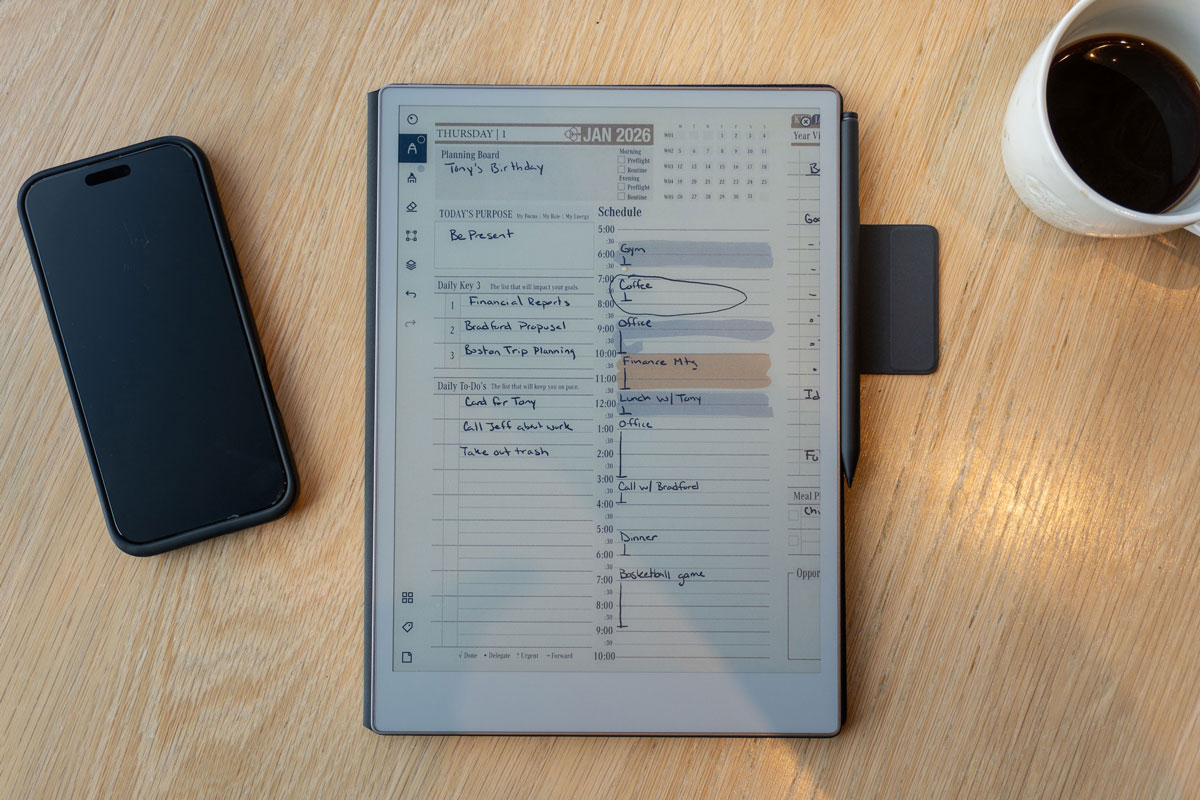
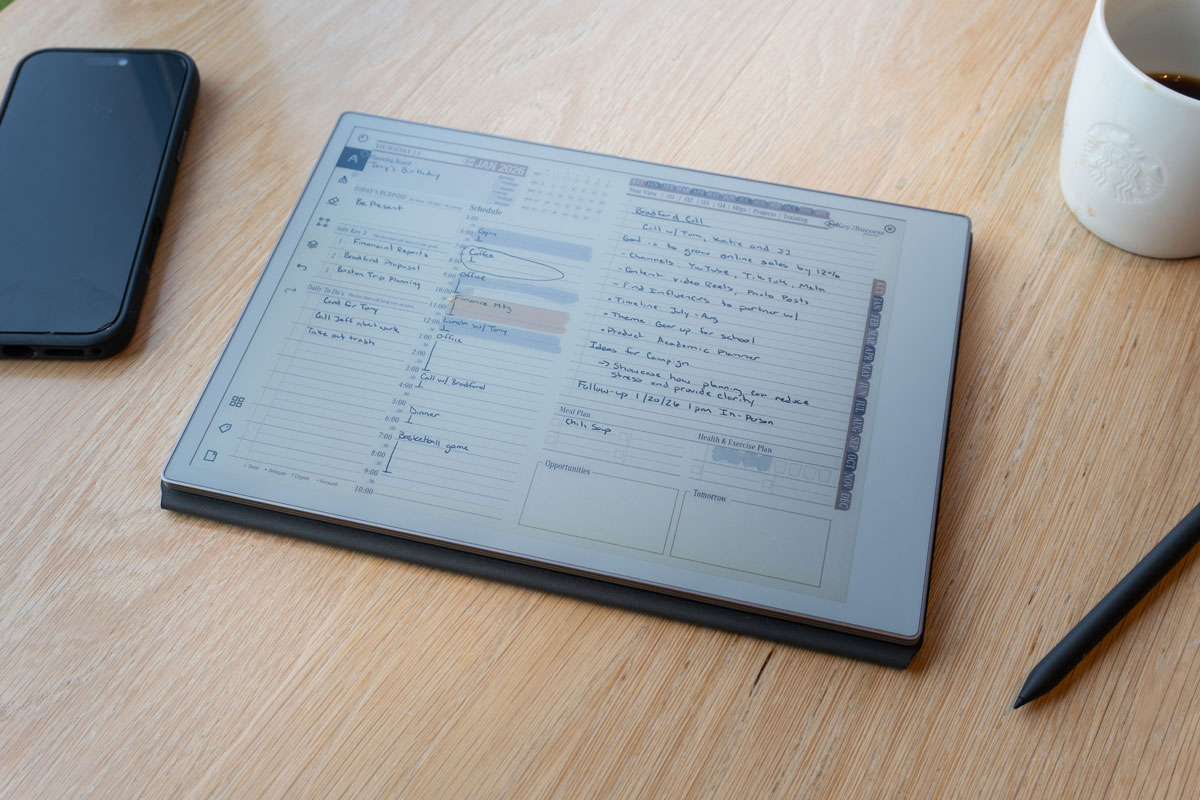
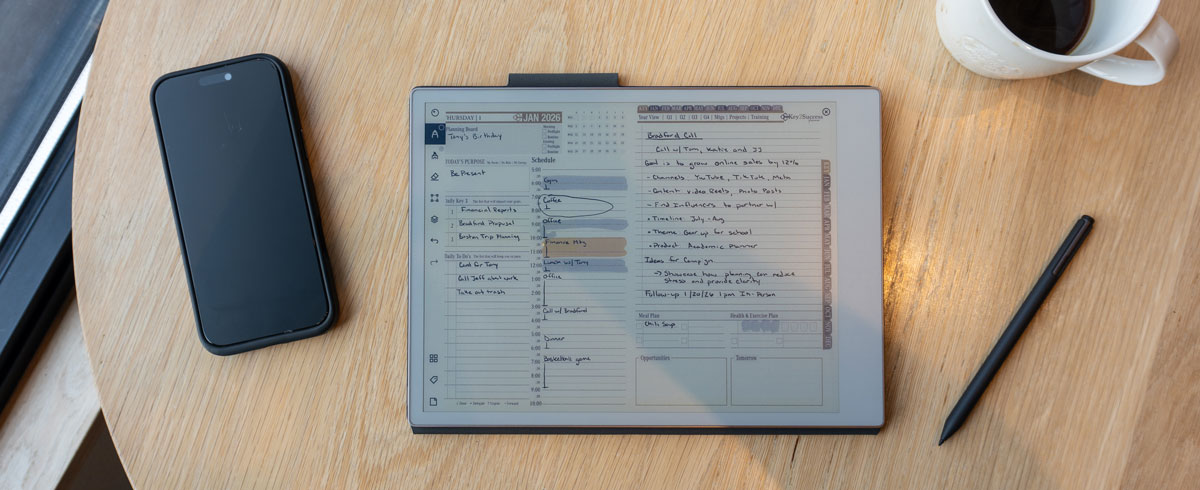
Key2Success Digital Planner open on a reMarkable tablet showing the daily planning page
See it in action

Watch how the K2S Planning System works on reMarkable

In this walkthrough, Branden Bodendorfer shows exactly how the Key2Success Planner turns your reMarkable into a complete productivity system — from the daily planning page to weekly reviews, goal tracking, and hyperlinked navigation.

  • How to navigate between daily, weekly, and monthly views with a single tap
  • Setting up your annual goals and breaking them into 90-day plans
  • The weekly review system that keeps priorities visible all week
  • How eTiles let you customize layouts without any coding
Get the planner →
Every device, covered

Built for the full reMarkable lineup

From the original reMarkable 1 to the new pocket-sized Paper Pro Move — every K2S edition installs and works natively on all five devices.

reMarkable 1
Original generation
10.3" Mono E-Ink
Supported
reMarkable 2
Most popular model
10.3" Mono E-Ink
Supported
Paper Pro
11.8" color canvas
Color E-Ink · Front-Lit
Supported
Paper Pro Move
Jacket-pocket portable
7.3" Color · 264 PPI
New 2025

Compact layout optimized for the 7.3" screen

Paper Pure
Focus-first tablet
10.3" Mono E-Ink
Spring 2026
Key2Success editions

A planner matched to where you are — and where you're going

Four distinct editions of the Key2Success Planning System, each designed for a specific stage of personal and professional growth. Not just different layouts — different systems with different goals.

Personal Edition

Personal

Built for individuals focused on life goals, habits, and daily wellbeing. Ideal for students, creatives, and anyone building better routines on their reMarkable.

  • Daily + weekly + monthly planning
  • Habit tracker & wellness logs
  • Personal goal setting framework
  • Gratitude & reflection pages
  • Reading & learning tracker
View Personal Edition →
Professional Edition

Professional

Designed for working professionals managing projects, meetings, and career development. The planning layer your reMarkable was always capable of supporting.

  • Meeting notes & action item capture
  • Project tracking & milestones
  • Weekly review & prioritization
  • Career development planning
  • Deep work & time blocking
View Professional Edition →
Business Edition

Business

For entrepreneurs, managers, and small business owners running teams and operations. Strategy, accountability, and execution in a single portable system.

  • 90-day business planning cycles
  • Team & delegation tracking
  • Revenue & pipeline overview
  • KPI & OKR tracking pages
  • Client & stakeholder logs
View Business Edition →
Executive Edition

Executive

Built for senior leaders, executives, and founders operating at the highest level. Strategic thinking, board-level planning, and personal development — all on one device.

  • Annual & quarterly strategic planning
  • Board prep & leadership journaling
  • Executive decision framework
  • Vision & legacy planning pages
  • High-stakes meeting architecture
View Executive Edition →

Not sure which edition fits? All four editions work on every reMarkable device — including the new Paper Pro Move. Each edition is a one-time purchase with lifetime access.

Compare Editions →
Also available

eTiles for reMarkable

Reusable digital sticker elements. Build custom planner layouts directly on your reMarkable — no apps, no imports, just drag and plan.

[Tile 1]
[Tile 2]
[Tile 3]
[Tile 4]
[Tile 5]
[Tile 6]

[eTile product grid — show variety of available tiles]

  • Drag-and-drop elements — no coding required
  • Works natively on reMarkable — no third-party app
  • Mix and match to build any layout you need
  • Compatible with all K2S editions
  • One-time purchase, unlimited use
Explore eTiles →
What planners say

Real reMarkable users. Real results.

“

[TESTIMONIAL — K2S gave their reMarkable a purpose and system they couldn't find elsewhere. 2–3 sentences, authentic voice.]

[Customer Full Name]
reMarkable 2 · Professional Edition
“

[TESTIMONIAL — About weekly planning habit change or goal tracking feature. Mention specific planner section if possible.]

[Customer Full Name]
Paper Pro · Business Edition
“

[TESTIMONIAL — Ease of install or Paper Pro Move portable use case. Good for the new-owner audience segment.]

[Customer Full Name]
Paper Pro Move · Executive Edition
From the blog

Guides, tips & deep dives

All articles →
[Install guide featured image]
Device guide
How to install a digital planner on reMarkable 2 (step-by-step)
5 min read · Setup
[Weekly review featured image]
Productivity
How to build a weekly review system on reMarkable
8 min read · Planning system
[Paper Pro Move featured image]
New device
reMarkable Paper Pro Move: planning on the go
6 min read · Device guide

Ready to plan smarter on reMarkable?

Four editions. Every device. One planning system that grows with you.

Find Your Edition → Compare all editions
Key2Success reMarkable

The planning system built for focused, paper-like productivity on reMarkable. Four editions — Personal, Professional, Business, Executive.

reMarkable planning tips, new editions & guides.
Unsubscribe anytime.
Editions
  • Personal Edition
  • Professional Edition
  • Business Edition
  • Executive Edition
  • Compare Editions
Planners
  • reMarkable 2 Planner
  • Paper Pro Planner
  • Paper Pro Move
  • eTiles
  • Shop All →
Resources
  • Device Guides
  • Install Guide (rM2)
  • Install Guide (Move)
  • Productivity Guides
  • Blog
  • About Branden
  • Contact

© 2026 Key2Success Planner · remarkabledigitalplanner.com
Privacy Policy Terms of Use Sitemap
By Branden Bodendorfer
Scroll to Top